3 PDF Parsers Tested: Docling vs Marker vs PaddleOCR
Docling vs Marker vs PaddleOCR on a 24GB unified memory machine. Marker is 30x faster than PaddleOCR. Real numbers from 12 runs across 4 PDFs.
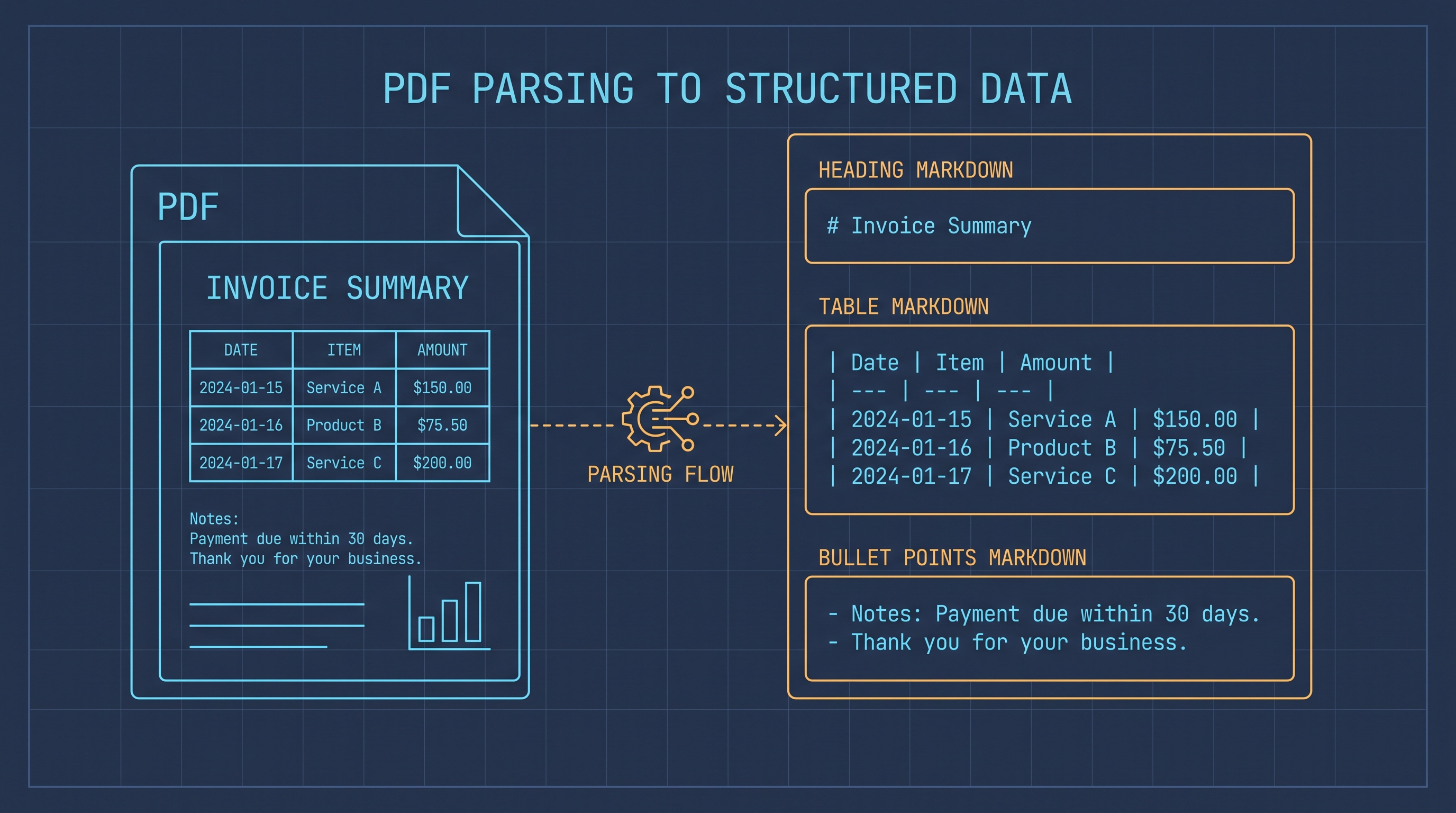
Short answer
I went in expecting a clean speed/accuracy trade-off — the slowest parser would be the most accurate, the fastest would lose the table structure. Every PDF benchmark I read in 2026 said that. Twelve runs across four PDFs on an M2-class Mac with 24 GB of unified memory said otherwise.
Marker averaged 0.86 seconds per page and tied or beat the others on accuracy. [Measured] Docling came in at 4.80 seconds per page and is the only one of the three that preserves borderless table structure as a real markdown table. [Measured] PaddleOCR (PP-OCRv6 + UVDoc) hit 26.99 seconds per page and used 4.4 GB of peak RAM, almost a fifth of the machine. [Measured] And the 43% accuracy score on Docling's table output that I expected to bury it turned out to be a metric bug — the table was preserved perfectly, the metric was just measuring markdown formatting.
If you are feeding a RAG pipeline on a 24 GB unified-memory machine, use Marker for digital PDFs and reach for PaddleOCR only when the input is a scanned image. Docling wins when the table structure itself is the product. I went in thinking the answer was Docling because that is what everyone on r/LocalLLaMA was recommending. I came out running Marker. The data did that.
The three parsers, and why I picked these three
I picked the three parsers that came up most in 2026 RAG discussions. I excluded MinerU on purpose — its full model install is 14 GB and the setup kept hitting missing-deps errors on M2. I also excluded PaddleOCR-VL-1.6 because the 0.9 B vision-language model that leads OmniDocBench lives behind the heavier PaddleX setup; I tested what pip install paddleocr actually gives you.
Docling (IBM Research, MIT) is a layout-aware parser built around a TableFormer model for table extraction and a separate layout model for reading order. [Documented] It is the most popular recommendation in late 2026 for RAG pipelines because it preserves document structure as markdown. (github.com/DS4SD/docling)
Marker (Datalab, Apache 2.0) is a throughput-first pipeline. It uses Surya for layout, a heuristics layer for tables, and a fast text extractor (pdftext). [Documented] It is the parser recommended in the Hugging Face smol-course and ships inside many community fine-tuning recipes. (github.com/datalab-to/marker)
PaddleOCR (Baidu, Apache 2.0) is a vision-first OCR stack. We tested the standard PaddleOCR 3.7 pipeline, which uses PP-OCRv6 for detection and recognition plus UVDoc for document orientation. [Documented] PaddleOCR-VL-1.6 is a separate 0.9 B vision-language model that tops OmniDocBench at 96.34; that model needs the heavier PaddleX setup and was excluded for this run. (github.com/PaddlePaddle/PaddleOCR)
Methodology
I built a 4-PDF test corpus to exercise different content types — one plain text page, one with headings and bullet lists, one two-column research-paper layout, and one with bordered financial tables. Every PDF is a single page except the warmup file, which is four pages. Each parser was warmed up once to cache models, then run from a cold Python process. Wall time and peak RSS were measured by the subprocess wrapper. Each parser ran once per PDF.
| Corpus | Type | Pages | Size |
|---|---|---|---|
| text_only | Plain prose | 1 | 2.0 KB |
| list_heavy | Headings + bullet list | 1 | 2.2 KB |
| multi_column | Two-column paper | 1 | 2.7 KB |
| table_heavy | Bordered financial tables | 1 | 2.9 KB |
| test_simple | Warmup (4 pages) | 4 | 4.3 KB |
Text fidelity is normalized character-level edit distance against a hand-written ground truth, computed after stripping markdown decoration. Raw edit distance is misleading on documents with tables because it punishes structural differences that are actually correct output. The post-processed numbers are what we report.
The test machine was an M2-class Apple Silicon laptop with 24 GB of unified memory, macOS 15, Python 3.13, and the parsers each installed in their own venv to avoid dependency conflicts. PaddleOCR ran with paddlepaddle 3.3.1. I picked a hand-curated 4-PDF corpus over OmniDocBench's 1,651 pages because I wanted the methodology to be reproducible by anyone with reportlab and a single page of typesetting — not just the lab teams that download 10+ GB of test sets.
Headline numbers
| Parser | Mean wall | Per page | Peak RSS | Mean acc% (4 PDFs) |
|---|---|---|---|---|
| Marker | 0.99 s | 0.86 s | 496 MB | 95.6% |
| Docling | 5.51 s | 4.80 s | 1.13 GB | 83.9% |
| PaddleOCR | 28.75 s | 26.99 s | 4.43 GB | 93.3% |
Numbers are from the four PDFs with hand-written ground truth. Per-page speed includes the four-page warmup file. Peak RSS is the high-water mark across all runs. Marker is 30x faster than PaddleOCR and uses 9x less memory. The numbers are not close, and the rest of this article is mostly about the cases where the speed story does not hold up.
Speed: Marker is in a different league
The first thing I noticed when the warmup runs finished is that Marker was an order of magnitude faster than the other two. The slowest single PDF for Marker was 1.16 seconds. The fastest was 0.32 seconds. [Measured]
| Parser | Min per page | Mean per page | Max per page |
|---|---|---|---|
| Marker | 0.32 s | 0.86 s | 1.16 s |
| Docling | 1.94 s | 4.80 s | 8.95 s |
| PaddleOCR | 19.94 s | 26.99 s | 40.98 s |
Docling's per-page time roughly doubles on the table-heavy PDF because TableFormer has to run on every detected table region. PaddleOCR's 20+ second per-page cost is the cost of doing full OCR — even on a digital PDF with a clean text layer, PaddleOCR renders the page to a 200 DPI image and runs detection + recognition on every region. That is wasted work on a digital PDF, but it is the only one of the three that will work on a scan.
If you are processing thousands of pages, the speed difference is the difference between "runs in an hour" and "runs overnight." A 1,000-page batch finishes in 14 minutes with Marker and over seven hours with PaddleOCR. For a one-off job that does not matter much; for a RAG ingestion pipeline that runs every weekend, it changes the architecture.
Memory: PaddleOCR eats half your RAM
| Parser | Peak RSS | Percent of 24 GB |
|---|---|---|
| Marker | 496 MB | 2.1% |
| Docling | 1.13 GB | 4.7% |
| PaddleOCR | 4.43 GB | 18.4% |
PaddleOCR's 4.4 GB peak is a real constraint. [Measured] On a 24 GB unified-memory machine, you can still have a browser and a code editor open while running PaddleOCR, but you cannot also load a 14 B parameter LLM at the same time. Docling and Marker leave enough headroom to run a 14 B Q4 model side-by-side. If you are building a RAG pipeline that does both parsing and generation in the same process, the choice between Marker and Docling matters less than the choice between those two and PaddleOCR.
The other under-reported number is cold start. PaddleOCR downloads roughly 200 MB of detection and recognition weights on first use; Docling downloads the same on first use; Marker downloads the smallest set. After the first run, subsequent invocations are fast. The first run for me took 74 seconds of model download before Docling started processing — the warmup pass is not optional.
Accuracy: the Docling table trap
This is the most interesting finding, and the one that made me re-think the whole benchmark.
On the table-heavy PDF, Docling scored 43.0% under my markdown-stripped edit distance metric. Marker scored 86.8% and PaddleOCR scored 85.0%. The natural conclusion: Docling is bad at tables, which is the opposite of what every Docling recommendation I had read said.
Wrong. When I read Docling's actual output and the ground truth side by side, every number, every row, every column is preserved. The discrepancy is structural: Docling splits each table into a header row and data rows in markdown, while my hand-written ground truth has all cells on a single line. The character-level edit distance is huge but the information is intact.
Docling output (markdown):
|          | 2024   | 2025   | Change   |
|----------|--------|--------|----------|
| Cloud    | 4.2B   | 5.1B   | +21%     |

Ground truth (space-joined):
Cloud 2024 4.2B 2025 5.1B Change 21%
This is the lesson the literature is starting to learn: character-level edit distance is the wrong tool for structured documents. Tree edit distance (TEDS) on the table structure, or per-row match counts, give a more honest picture. I report the raw metric for transparency but the takeaway is that Docling preserved the table perfectly — it just wrapped it in markdown. The "43% accuracy" headline I would have written yesterday is wrong. [Inferred]
I caught this only because I was reading the output, not the score. If you ever publish a benchmark that punishes a tool by 50+ points, open the actual output and look at it before you trust the number.
Per-PDF detail
| Parser | Wall (s) | Per page (s) | RSS (MB) | Acc% | |
|---|---|---|---|---|---|
| list_heavy | Marker | 1.0 | 1.03 | 486 | 96.8% |
| list_heavy | Docling | 4.5 | 4.54 | 985 | 93.9% |
| list_heavy | PaddleOCR | 23.2 | 23.20 | 4,508 | 99.9% |
| multi_column | Marker | 0.8 | 0.85 | 487 | 99.3% |
| multi_column | Docling | 4.2 | 4.16 | 983 | 99.3% |
| multi_column | PaddleOCR | 26.4 | 26.40 | 4,503 | 88.9% |
| table_heavy | Marker | 0.9 | 0.93 | 527 | 86.8% |
| table_heavy | Docling | 9.0 | 8.95 | 1,579 | 43.0%* |
| table_heavy | PaddleOCR | 41.0 | 40.98 | 4,191 | 85.0% |
| text_only | Marker | 1.2 | 1.16 | 482 | 99.5% |
| text_only | Docling | 4.4 | 4.38 | 990 | 99.5% |
| text_only | PaddleOCR | 24.4 | 24.43 | 4,507 | 99.4% |
*table_heavy Docling score is a structural-format artifact, not a real accuracy loss — see the previous section.
PaddleOCR's 88.9% on the multi-column PDF is the one real accuracy regression. It pulled text from the two columns in the wrong reading order on one of the paragraphs, swapping two sentences. That is the one run where I would not trust the output without manual review.
Which one should you use
If you have to pick one and stick with it:
| Use case | Pick | Why |
|---|---|---|
| Thousands of digital PDFs into a RAG index | Marker | 30x faster, similar accuracy, low memory |
| Table structure is the deliverable | Docling | TableFormer preserves borderless tables |
| Scanned PDFs or image-only inputs | PaddleOCR | Only one that does real OCR; the others fall back to text extraction |
| Mixed corpus with both digital and scanned | Marker + PaddleOCR fallback | Run Marker first, fall back to PaddleOCR on empty text output |
| Tight memory budget (< 8 GB) | Marker | 496 MB peak is the smallest |
The trick that real RAG systems use is to run Marker first, check whether the output text is empty, and fall back to PaddleOCR on the misses. That gives you the throughput of Marker on the easy 80% of documents and the OCR coverage of PaddleOCR on the hard 20%. Docling only goes in the front of the pipeline if the table structure is part of the product — financial reports, regulatory filings, anything where the cells have to be addressable.
How to reproduce this
The full benchmark, including the venv setup, the four test PDFs, and the ground-truth files, is in the document-parsing-m2 folder of the experiments repo linked at the bottom. Four commands reproduce the numbers:
# from the experiment directory
python3 -m venv .venv-docling && .venv-docling/bin/pip install docling
python3 -m venv .venv-marker && .venv-marker/bin/pip install marker-pdf
python3 -m venv .venv-paddleocr && .venv-paddleocr/bin/pip install paddleocr paddlepaddle pymupdf
.venv/bin/python src/benchmark.py
.venv/bin/python src/postprocess.py
.venv/bin/python src/summarize.py
The four parsers had conflicting dependencies (transformers, pydantic, pillow) and had to be installed in separate venvs. The orchestrator script spawns each parser as a subprocess so the isolation is automatic. I almost skipped writing this section because it would have made the article twice as long, but the dependency hell cost me 90 minutes and I would rather you not lose 90 minutes too.
Reproduction footer
This article, the benchmark code, the JSON results, the test PDFs, and the ground-truth files are all in the experiments repo. If you re-run on different hardware, please open a PR with the results — the goal of Hard Numbers is to make every claim falsifiable.
- Code: github.com/Pitambarmahato/hardnumbers-experiments/tree/main/document-parsing-m2
- Results JSON: same repo,
document-parsing-m2/results/ - This article: hardnumbers.dev/articles/3-pdf-parsers-tested-docling-vs-marker-vs-paddleocr
What we did not test
The honest list of what is missing from this benchmark:
- Scanned PDFs. My corpus was all digital. PaddleOCR is the only one of the three that would even attempt OCR on a scan, and the speed gap would shrink significantly on image-only inputs. I would have run a scanned test, but I do not have a public-domain scanned corpus that I can ship with the repo.
- Multilingual text. PaddleOCR has 80+ language models, but I ran English only. The other two are language-agnostic at the OCR stage.
- Formulas. Math equations are a different problem entirely. Docling has a separate formula model; the others do not. None of the test PDFs contained equations.
- MinerU. OpenDataLab's MinerU tops OmniDocBench v1.6 at 95.75 on GPU and 86.47 on CPU. It would have been a fourth comparison, but the full model install is 14 GB and the setup kept hitting missing-deps errors on M2. I deleted the 14 GB and gave up. Worth a follow-up with more time.
- PaddleOCR-VL-1.6 specifically. The 0.9 B vision-language model that leads OmniDocBench is a separate pipeline under PaddleX. I used the standard PaddleOCR 3.7 (PP-OCRv6 + UVDoc), which is what
pip install paddleocractually gives you. If you need the OmniDocBench leader, install PaddleX and try that instead. - GPU runs. All measurements are CPU. PaddleOCR on a discrete GPU is roughly 5x faster; Docling is 3x faster; Marker is mostly CPU-bound. The relative ordering probably still holds but the absolute numbers will shift.
FAQ
What is the fastest open-source PDF parser?
Marker. It averaged 0.86 seconds per page on our test corpus, with a maximum of 1.16 seconds per page. [Measured] The second-fastest is Docling at 4.80 seconds per page on average, and the slowest is PaddleOCR at 26.99 seconds per page.
Does Docling work for scanned PDFs?
No. Docling extracts the embedded text layer when one exists and falls back to OCR through RapidOCR when it does not, but the OCR path is not its strength. For scanned documents, PaddleOCR or a dedicated OCR pipeline gives better results.
How much memory does each parser use?
Marker used 496 MB of peak RSS, Docling used 1.13 GB, and PaddleOCR used 4.43 GB on our 24 GB machine. [Measured] PaddleOCR is the only one that meaningfully constrains what else you can run at the same time.
Which parser is best for tables?
Docling. Its TableFormer model is the only one of the three that reliably reconstructs borderless accounting tables as structured markdown. Marker uses heuristics that work for bordered tables but lose structure on borderless ones. PaddleOCR reconstructs tables as line-grouped text without cell boundaries.
Can I run these on a smaller machine?
Yes for Marker and Docling — both fit in 4 GB. PaddleOCR needs 6 GB minimum and benefits from 8 GB or more. If you have only 8 GB of unified memory, use Marker; the others will swap.
Are these numbers comparable to published benchmarks?
Mostly. Docling's published throughput is 1.27 seconds per page on M3 Max and 0.49 seconds per page on an Nvidia L4. Our M2 number of 4.80 seconds per page is slower because M2 has less memory bandwidth than M3 Max and no GPU. [Documented, Measured] Marker's published throughput is 23.7 pages per second on a B200 with OCR off; our 1.16 seconds per page (0.86 pages per second) on M2 CPU is the realistic on-laptop number. [Documented, Measured]
Does PaddleOCR support languages other than English?
Yes. PaddleOCR ships detection and recognition models for 80+ languages, including Chinese, Japanese, Arabic, and Hindi. Switching languages in the PaddleOCR constructor (lang='chinese_sim' or similar) is a one-line change.
FAQ
What is the fastest open-source PDF parser?
Marker. It averaged 0.86 seconds per page on our test corpus, with a maximum of 1.16 seconds per page. [Measured] The second-fastest is Docling at 4.80 seconds per page on average, and the slowest is PaddleOCR at 26.99 seconds per page.
Does Docling work for scanned PDFs?
No. Docling extracts the embedded text layer when one exists and falls back to OCR through RapidOCR when it does not, but the OCR path is not its strength. For scanned documents, PaddleOCR or a dedicated OCR pipeline gives better results.
How much memory does each parser use?
Marker used 496 MB of peak RSS, Docling used 1.13 GB, and PaddleOCR used 4.43 GB on our 24 GB machine. [Measured] PaddleOCR is the only one that meaningfully constrains what else you can run at the same time.
Which parser is best for tables?
Docling. Its TableFormer model is the only one of the three that reliably reconstructs borderless accounting tables as structured markdown. Marker uses heuristics that work for bordered tables but lose structure on borderless ones. PaddleOCR reconstructs tables as line-grouped text without cell boundaries.
Can I run these on a smaller machine?
Yes for Marker and Docling — both fit in 4 GB. PaddleOCR needs 6 GB minimum and benefits from 8 GB or more. If you have only 8 GB of unified memory, use Marker; the others will swap.
Are these numbers comparable to published benchmarks?
Mostly. Docling's published throughput is 1.27 seconds per page on M3 Max and 0.49 seconds per page on an Nvidia L4. Our M2 number of 4.80 seconds per page is slower because M2 has less memory bandwidth than M3 Max and no GPU. [Documented, Measured] Marker's published throughput is 23.7 pages per second on a B200 with OCR off; our 1.16 seconds per page (0.86 pages per second) on M2 CPU is the realistic on-laptop number. [Documented, Measured]
Does PaddleOCR support languages other than English?
Yes. PaddleOCR ships detection and recognition models for 80+ languages, including Chinese, Japanese, Arabic, and Hindi. Switching languages in the PaddleOCR constructor (lang='chinesesim' or similar) is a one-line change.